
Blogs
How to Check a Refurbished Laptop Before Buying: Complete Guide 2026

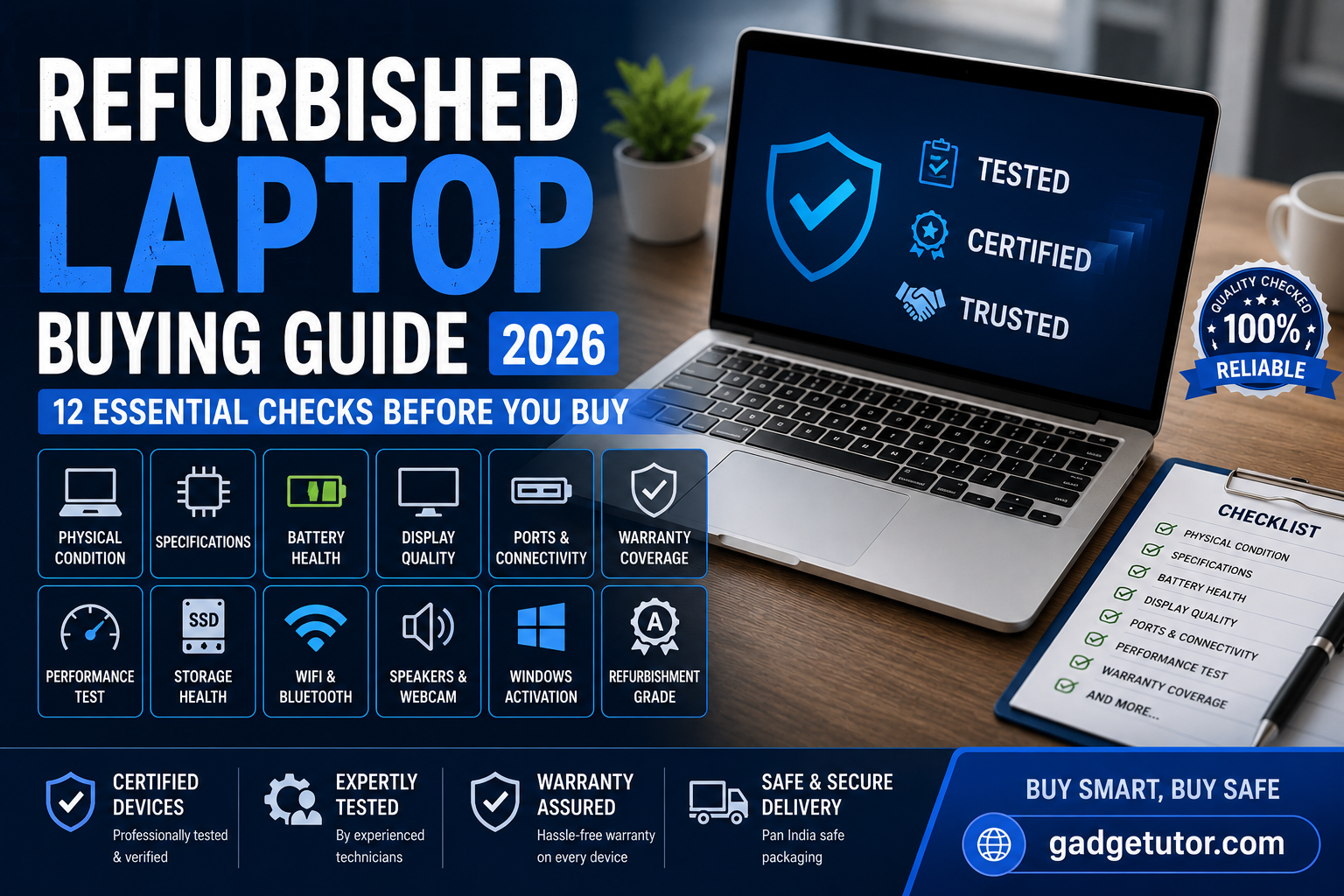
How to check a refurbished laptop before buying is one of the most important questions every buyer should ask before investing in a pre-owned device. A refurbished laptop can offer excellent value for money, but only if it has been properly tested and restored. In this complete 2026 guide, you’ll learn how to inspect battery health, display quality, specifications, ports, storage, warranty, and overall performance before making your purchase.
Buying a refurbished laptop can save you thousands of rupees while giving you access to premium models from brands like Dell, HP, Lenovo, and Apple. However, not all refurbished laptops offer the same quality.
Before spending your money, it’s important to inspect the laptop carefully to ensure you’re getting a reliable device that will last for years.
This guide covers everything you should check before buying a refurbished laptop in 2026.
What Is a Refurbished Laptop?
A refurbished laptop is a pre-owned device that has been professionally inspected, repaired if necessary, cleaned, tested, and restored to working condition before being resold.
Unlike used laptops sold by individual owners, refurbished laptops often undergo:
- Hardware testing
- Component replacement
- Battery inspection
- Software installation
- Quality assurance checks
1. Check the Laptop’s Physical Condition
The first thing you should inspect is the exterior condition.
Look for:
Body Damage
Check for:
- Cracks
- Deep scratches
- Broken hinges
- Bent corners
- Missing screws
Minor cosmetic wear is normal, but structural damage could indicate past accidents.
Keyboard Condition
Test every key.
Make sure:
- All keys respond properly
- Backlighting works (if included)
- No keys are loose or missing
Trackpad Functionality
Verify:
- Smooth cursor movement
- Multi-touch gestures
- Left and right click operation
2. Verify Laptop Specifications
Many buyers make the mistake of trusting the seller’s listing without verifying specifications.
Check:
Processor
Press:
Windows + RType:
msinfo32Confirm the installed processor matches the advertised model.
Popular processors include:
- Intel Core i5
- Intel Core i7
- Intel Core Ultra
- AMD Ryzen 5
- AMD Ryzen 7
RAM
Verify:
- Installed RAM
- RAM speed
- Upgrade capability
For 2026:
- 8GB = Basic use
- 16GB = Recommended
- 32GB+ = Professional work
Storage
Check:
- SSD capacity
- SSD health
- Available storage
Avoid laptops still running on older HDDs unless you’re getting an exceptional deal.
3. Check Battery Health
Battery condition is one of the most important factors when buying a refurbished laptop.
Open Command Prompt and run:
powercfg /batteryreportReview:
- Design Capacity
- Full Charge Capacity
- Battery Cycle Count
A healthy battery should retain at least 75–85% of its original capacity.
4. Test the Display Carefully
Display replacements can be expensive.
Check for:
Dead Pixels
Open a solid-color screen and inspect for:
- Black dots
- White dots
- Stuck pixels
Screen Brightness
Verify:
- Brightness adjustment works
- No flickering
- Uniform lighting
Color Accuracy
Look for:
- Yellow tint
- Burn-in
- Discoloration
Especially important on premium laptops and creative workstations.
5. Test All Ports
Connect devices to every available port.
Test:
- USB-A
- USB-C
- HDMI
- Ethernet
- Audio Jack
- SD Card Reader
Faulty ports are common issues in older refurbished devices.
6. Check Wi-Fi and Bluetooth
Verify:
Wi-Fi
- Connect to a network
- Browse websites
- Run a speed test
Bluetooth
Pair:
- Earbuds
- Mouse
- Keyboard
Connectivity issues can indicate hardware faults.
7. Inspect the Webcam and Speakers
Open the camera application.
Check:
- Video quality
- Autofocus
- Microphone clarity
Then test:
- Left speaker
- Right speaker
- Maximum volume output
Distorted audio may indicate internal damage.
8. Run Performance Tests
Open multiple applications simultaneously.
Monitor:
- Startup speed
- Fan noise
- Temperature
- Application responsiveness
A properly refurbished laptop should feel smooth and stable.
9. Verify SSD Health
Use tools such as:
- CrystalDiskInfo
- Manufacturer diagnostics
Check:
- SSD health percentage
- Read/write errors
- Remaining lifespan
A healthy SSD significantly improves system performance.
10. Confirm Warranty Coverage
Always ask:
Is There a Warranty?
Reliable refurbished sellers should provide:
- Testing report
- Return policy
- Limited warranty
Avoid sellers offering no warranty at all.
11. Check Windows Activation
Open:
Settings > System > ActivationEnsure:
Windows is ActivatedThis prevents licensing issues later.
12. Review Refurbishment Grade
Most refurbished laptops are classified as:
Grade A
- Excellent condition
- Minimal signs of use
Grade B
- Minor cosmetic wear
Grade C
- Visible wear
- Budget option
Grade A devices generally offer the best balance of appearance and reliability.
Red Flags to Avoid
Do not buy if you notice:
❌ Swollen battery
❌ Broken hinges
❌ Overheating
❌ Non-functional ports
❌ Display flickering
❌ No warranty
❌ Unknown refurbishment history
❌ Suspiciously low prices
Why Buy Refurbished Instead of New?
Benefits include:
- Significant savings
- Better specifications for the same budget
- Reduced electronic waste
- Access to premium business laptops
A refurbished premium laptop often outperforms a brand-new budget laptop at the same price point.
Final Thoughts
Buying a refurbished laptop is an excellent way to save money without sacrificing performance. The key is performing a thorough inspection before making your purchase.
Always verify the specifications, battery health, display quality, SSD condition, connectivity features, and warranty coverage. A professionally refurbished laptop can provide years of reliable service when purchased from a trusted seller.
If you’re looking for tested and warranty-backed refurbished laptops, Gadgetutor offers carefully inspected devices that undergo comprehensive quality checks before reaching customers.
How to Check a Refurbished Laptop Before Buying – FAQs
Is it safe to buy a refurbished laptop?
Yes. A professionally refurbished laptop from a trusted seller can be a reliable and cost-effective alternative to a new device.
How much battery health should a refurbished laptop have?
A healthy refurbished laptop battery should typically retain at least 75–85% of its original capacity.
Are refurbished laptops better than used laptops?
Generally yes. Refurbished laptops are tested, repaired, cleaned, and quality-checked before resale.
What should I check first when buying a refurbished laptop?
Start with the physical condition, battery health, specifications, display quality, and warranty coverage.
How long do refurbished laptops last?
A quality refurbished laptop can easily last 3–5 years or more depending on usage and maintenance.